XCLoom 持续实测基准
最近实测:2026-11-26
本页面为 XCLoom 的永久基准归档地址,记录了 6 个公开开源 iOS 仓库(scripts/bench/direct-engine-large-oss.sh,v0.10.0,实测日期 2026-11-24)、真实上线 iOS + watchOS 应用(打包 77.7 MB .ipa,含 7 个嵌套 Bundle)、内置双档轻量模拟器池(scripts/bench/bench-sim-slim-vs-stock.sh)以及本地签名与上传工具链(scripts/bench/run-all.sh)的实测数据。基准脚本均已提交至仓库,原始 TSV、汇总与宿主机负载日志存档在 docs/claims-ledger.md 与 tests/corpus/bench/large-oss-direct-engine/ 中。尚未实测的单元格保持待测标记,待实测记录出原始数据后再填入。
核心实测数据
- 在作者自有真实上线 iOS + watchOS 应用(77.7 MB
.ipa)的两段真实 Claude Code 会话中(总长 208.2 min 与 109.2 min),本地工具等待分别占 71%(147.1 min:UI 驱动 84.1 min、构建+驱动 45.5 min、构建脚本 9.4 min、其余本地工具 8.1 min)和 69%(75.1 min:UI 驱动 41.6 min、构建+驱动 26.5 min、构建脚本 3.7 min、其余本地工具 3.3 min),模型思考仅占 29%(61.1 min)和 31%(34.1 min)。 - 在作者模块化真实上线应用(77.7 MB
.ipa,7 个嵌套 Bundle)上,XCLoom 直连引擎单文件 Swift 修改耗时 2.41s(命中118/2次 CAS),新建 git worktree 构建耗时 1.32s(命中124/0次 CAS),热态.dylib补丁耗时 0.36s(体积 63 KB;此处为独立实测,不与旧串行脚本并列对比,同口径公开仓对比见下方)。 - 在
2026-11-24的 6 仓统一 3 轮基准测试中(scripts/bench/direct-engine-large-oss.sh --preset all --rounds 3),全部 6 个开源仓库均通过direct引擎编译(fallback_reason=-),在 24/24 个单元格中全部快于原生xcodebuild。主倍率仅采信原生侧相对记入docs/claims-ledger.md的早期安静基线波动<= 15%的稳定单元格:冷态 A(除wikipedia-ios外的 5 仓)提速 1.11x–3.07x,新建 Worktree C(除NetNewsWire外的 5 仓)提速 3.96x–51.5x(sample-food-truck23.16s -> 0.45s[51.5x]、IceCubesApp45.97s -> 1.00s[46.0x]、Swiftfin58.70s -> 3.03s[19.4x]、Signal-iOS74.10s -> 5.15s[14.4x]、wikipedia-ios47.36s -> 11.95s[3.96x])。早先的apple/sample-food-truck测试记录(scripts/bench/direct-engine-food-truck.sh,含 0.37s 热态.dylib补丁对比 3.81s 单行编辑)单独列于下方,因当时尚未合入并行xcloom-car资源编译。 - 内置双档启动前模拟器瘦身(19 个守护进程分类、24 项常驻受保护守护进程,
scripts/bench/bench-sim-slim-vs-stock.sh --rounds 2,2026-11-22)在安全默认档(xcloom sim boot默认瘦身、--stock可关闭,停用 147 项并保留widgets/store/photos)将物理内存(ri_phys_footprint)从 1.88 GiB 降至 1.50 GiB(-20.3%,-0.38 GiB),活跃launchd_sim守护进程从 213 降至 140(-34.3%),冷启2.37s -> 2.94s(+0.57s);在应用感知档(xcloom sim boot --for MinimalApp.app,经 2–15 ms 静态分析最多停用 160 项)将物理内存从 1.70 GiB 降至 0.72 GiB(-57.3%;未舍入值1.695 -> 0.724 GiB,-0.97 GiB),守护进程从 190 降至 85(-55.3%),冷启2.49s -> 3.02s(+0.53s)。单次 RunLoop 2x2 UI 截图核查(xcloom canvas matrix-act,已预热轻量iPhone 17,不含开机与首次拉起)在完整 SwiftUI + Swift Charts 应用apple/sample-food-truck上耗时 1.44s(CLI 3 轮中位数 1441.4 ms,区间 1433.7–1458.2 ms;探针中位数 1468.6 ms;2026-11-25,Xcode 27.2,xcloom d026aff),在最小 UIKit 基准MatrixSweepOracle上耗时 0.064s(端到端 63.8 ms / 探针中位数 63 ms,822x1808PNG,0 台模拟器泄漏)。 - 在同一份 77.7 MB 生产
.ipa上,xcloom upload-asc经 15 个分块(16 路 HTTP/2 并发池)耗时 25.1s,对照组 5 轮 TestFlight 基线中altool上传耗时 67–118s(完整基线本地 4.0–7.1 min 加 Apple 服务端处理 3–5 min,端到端 8.8–11.1 min)。 - 在
scripts/bench/run-all.sh(9 轮中位数)中,无 Keychain 自签 Mach-O CMS 签名在 85 MB / 27 嵌套 Bundle 样本上耗时 0.43s(通过/usr/bin/codesign --verify --deep --strict校验);离线xcloom preflight(共 31 项离线检查:22 项 App StoreITMS-*规则[含ITMS-90174与隐私清单ITMS-91053/ITMS-91056及XCLOOM-PRIVACY-SDK-ONLY]加上 9 项XCLOOM-252-*开发期热更新残留检查)在 149 MB.ipa上耗时 0.66s(--method development)与 3.11s(--method app-store),在 77.7 MB 生产 App Store.ipa上耗时 1.87s,在 85 MB.ipa单次实测中耗时 0.39s,在Swiftfin模拟器包实测抓取中耗时 2294.4 ms(19 项通过、11 项报错、1 项警告)。
测试方法与原生校验
- 测试宿主机:Mac15,14(Apple M3 Ultra,32 核,512 GB 内存)。尚未在 16–36 GB 笔记本上实测。
- 系统、工具链与各抓取版本口径:macOS 26.6.2(
25G83)。v0.10.0为即将发布的首个公开版本;每张表格与终端抓取都在各自图注中标注实际日期、Xcode 版本(2026-11-246 仓套件为 Xcode 27.127A9275;宿主机2026-11-25升级后matrix/preflight/trace抓取为 Xcode 27.2)与具体 git commit SHA。 - 构建版本对应(
docs/claims-ledger.md):3c39d3c(2026-11-24)对应 6 仓统一套件(scripts/bench/direct-engine-large-oss.sh),cd2889d(2026-11-26,Xcode 27.2)对应Signal-iOS同批次热补丁基准(scripts/bench/hot-patch-large-oss.sh),377babb(2026-11-20)对应早期单仓sample-food-truck热补丁跑测(scripts/bench/direct-engine-food-truck.sh),94ba00c(2026-11-21)对应早期xcloom bench跑测,6cbf81a/d026aff(2026-11-25)对应终端实测抓取,89bba10为用于波动筛选的早期低负载参考基线。 - 公开套件运行条件:
scripts/bench/direct-engine-large-oss.sh --preset all --rounds 3(icecubes/netnewswire/swiftfin使用--wait-load 11,food-truck/signal-ios/wikipedia-ios使用--wait-load 14,每仓 3 轮冷启动,iphonesimulatorarm64,Debug;原始 TSV、汇总与load.txt位于tests/corpus/bench/large-oss-direct-engine/)在env -i、CODE_SIGNING_ALLOWED=NO、XCLOOM_NO_GLOBAL_CAS=1、关闭 Colima 条件下运行,远程 SwiftPM 依赖在计时轮次外预解析;scripts/bench/bench-sim-slim-vs-stock.sh --udid <UDID> --settle-secs 12 --rounds 2(以及--for MinimalApp.app,2026-11-22)在iPhone Air(iOS 27.3,12s 静置,rss_fallback_pids=0)上交替执行slim->stock与stock->slim两轮;scripts/bench/run-all.sh取 9 轮中位数。 - 真实上线应用案例:采集自作者私有线上 iOS + watchOS 应用(77.7 MB
.ipa,7 个嵌套 Bundle)及两段真实 Claude Code 会话。其中 Release 归档耗时(单文件 20.3s / 冷态 124.0s)口径为--adhoc-inspect的archive_seconds,含.ipa导出总耗时分别为 23.1s 与 126.7s。 - 产物校验基准:第 1 轮自动化校验统一执行 Apple 原生工具(
/usr/bin/codesign --verify --deep --strict、plutil -lint、otool -L),并在场景 D 中校验编入 Mach-O 二进制的标记符号;模拟器交互启动在 3 轮计时循环之外单独验证。 - 内存统计口径:模拟器内存严格读取 macOS
proc_pid_rusage的ri_phys_footprint(rss_fallback_pids=0),不采用重复计算共享页的 RSS。
6 个公开开源仓库对比矩阵
2026-11-24 通过 scripts/bench/direct-engine-large-oss.sh --preset all --rounds 3 实测(v0.10.0 构建 3c39d3c,icecubes/netnewswire/swiftfin 设 --wait-load 11,food-truck/signal-ios/wikipedia-ios 设 --wait-load 14,每仓 3 轮冷启动,iphonesimulator arm64,Debug;原始 TSV、汇总与 load.txt 存档于 tests/corpus/bench/large-oss-direct-engine/)。
新建 Worktree C(第二个 worktree wt2)
3.96x–51.5x主数字区间(稳定项) · 不含 NetNewsWire
- sample-food-truckapple
3954a769e99f23.16s0.45s11/0 CAS 命中 / 未命中
51.5x - IceCubesAppDimillian
98098b9c4b5945.97s1.00s63/0 CAS 命中 / 未命中
46.0x - Swiftfinjellyfin
5d48ca973c9e58.70s3.03s78/0 CAS 命中 / 未命中
19.4x - Signal-iOSsignalapp
a690a26d2cfe74.10s5.15s75/0 CAS 命中 / 未命中
14.4x - NetNewsWireRanchero-Software
cf07204cce7f22.47s1.60s54/4 CAS 命中 / 未命中
14.0x原生耗时波动超过 15%,不计入主区间 - wikipedia-ioswikimedia
11a763dea0c847.36s11.95s311/0 CAS 命中 / 未命中
3.96x
6 仓统一套件
scripts/bench/direct-engine-large-oss.sh --preset all --rounds 3
3c39d3c · 2026-11-24 · 3 轮中位数
apple/sample-food-truck · 新建 git worktree
apple/sample-food-truck 专项脚本
scripts/bench/direct-engine-food-truck.sh · 377babb · 2026-11-20
apple/sample-food-truck · 新建 git worktree
热态 .dylib 补丁
与 6 仓统一套件的 worktree 构造方式不同,并额外计时 xcloom hot。
| 开源仓库(固定 SHA) | 执行引擎 | 冷态 A(首个 worktree wt1)xcloom vs native | 无改动 B(wt1)xcloom vs native | 新建 Worktree C(第二个 worktree wt2)xcloom vs native | 单行编辑 D(wt2)xcloom vs native |
|---|---|---|---|---|---|
apple/sample-food-truck(3954a769e99f) | direct | 7.78s vs 23.90s(3.07x) | 0.22s vs 3.63s(16.5x) | 0.45s( 11/0 CAS)vs 23.16s(51.5x) | 1.51s vs 5.43s(3.60x) |
Dimillian/IceCubesApp(98098b9c4b59) | direct | 26.85s vs 45.68s(1.70x) | 0.63s vs 12.08s(19.2x) | 1.00s( 63/0 CAS)vs 45.97s(46.0x) | 3.30s vs 12.94s(3.92x) |
Ranchero-Software/NetNewsWire(cf07204cce7f) | direct | 14.27s vs 23.22s(1.63x) | 0.51s vs 15.12s(29.6x) | 1.60s( 54/4 CAS)vs 22.47s(14.0x) | 3.49s vs 14.29s(4.09x) |
jellyfin/Swiftfin(5d48ca973c9e) | direct | 56.65s vs 70.55s(1.25x) | 2.03s vs 11.74s(5.78x) | 3.03s( 78/0 CAS)vs 58.70s(19.4x) | 18.28s vs 32.83s(1.80x) |
signalapp/Signal-iOS(a690a26d2cfe) | direct | 69.02s vs 76.70s(1.11x) | 1.94s vs 10.27s(5.29x) | 5.15s( 75/0 CAS)vs 74.10s(14.4x) | 14.18s vs 31.16s(2.20x) |
wikimedia/wikipedia-ios(11a763dea0c8) | direct | 48.37s vs 62.34s(1.29x) | 9.70s vs 23.50s(2.42x) | 11.95s( 311/0 CAS)vs 47.36s(3.96x) | 16.00s vs 23.96s(1.50x) |
主倍率口径与宿主机负载披露:全部 6 个仓库均经由 direct 引擎编译(fallback_reason=-),在 24/24 个单元格中全部快于原生 xcodebuild;即使改用记入 docs/claims-ledger.md 的早期安静基线(89bba10)原生中位数重算,XCLoom 依然保持 24/24 全胜,最小领先幅度为 wikipedia-ios 冷态 A 的 1.06x(51.24s 对比 48.37s)与 Swiftfin 冷态 A 的 1.10x(62.51s 对比 56.65s)。本轮测试开始负载为 10.4–13.8,结束负载为 10.7–33.2,24 个单元格中共 11 个原生 xcodebuild 相对 89bba10 漂移超过 15%:其中 9 个落在场景 B 与 D(本来就不计入 A/C 主标题倍率),另 2 个为 wikipedia-ios 冷态 A 与 NetNewsWire 新建 Worktree C,已从对外主标题倍率中剔除(主标题稳定口径:冷态 A 1.11x–3.07x,新建 Worktree C 3.96x–51.5x)。在 Signal-iOS 冷态 A 中,第 1 轮遇到 50.38 瞬时负载尖峰,导致 XCLoom 最慢单轮(99.34s)慢于原生最慢单轮(82.79s),但 3 轮中位数仍快于原生(69.02s 对比 76.70s)。
apple/sample-food-truck 冷态 A 提速 3.07x(23.90s -> 7.78s)拆解:在清空全局缓存条件下(XCLOOM_NO_GLOBAL_CAS=1),主 App 与 Widgets 之间在单次构建内复用了 2/10 个 FoodTruckKit 产物,其余提速来自并行 xcloom-car 资源目录编译(早于 actool)、拆分 SDK 模块预热以及多 target 流水线重叠调度。第 1 轮自动化产物已全部通过 plutil -lint、otool -L、/usr/bin/codesign --verify --deep --strict 与场景 D 标记符号复核(交互式模拟器启动在计时循环外单独验证)。
3 轮原始最小–最大值区间(xcloom 对比 native):
apple/sample-food-truck:A 7.37–11.06s vs 23.89–24.12s,B 0.19–0.29s vs 3.21–3.63s,C 0.41–0.60s vs 23.07–23.86s,D 1.39–2.64s vs 4.77–8.42s。Dimillian/IceCubesApp:A 25.71–28.34s vs 40.96–50.86s,B 0.61–1.34s vs 10.19–13.78s,C 0.64–1.11s vs 41.74–46.39s,D 3.27–3.51s vs 9.34–13.08s。Ranchero-Software/NetNewsWire:A 14.23–14.51s vs 21.86–30.48s,B 0.50–0.51s vs 14.00–15.18s,C 1.56–1.62s vs 19.07–29.60s,D 3.46–3.56s vs 13.86–16.13s。jellyfin/Swiftfin:A 54.27–57.48s vs 67.21–80.77s,B 1.94–2.26s vs 11.52–17.47s,C 3.01–3.22s vs 56.78–66.54s,D 15.03–18.53s vs 32.23–32.94s。signalapp/Signal-iOS:A 66.23–99.34s vs 76.04–82.79s(第 1 轮出现 50.38 瞬时结束负载),B 1.93–2.12s vs 9.80–12.25s,C 4.96–5.31s vs 70.41–125.34s,D 13.73–14.95s vs 24.34–33.46s。wikimedia/wikipedia-ios:A 45.94–49.50s vs 60.48–62.80s,B 9.68–9.78s vs 15.15–28.90s,C 11.57–14.75s vs 46.27–51.01s,D 15.04–16.69s vs 22.03–29.46s。
同批次 Signal-iOS 热态 .dylib 补丁实测(scripts/bench/hot-patch-large-oss.sh,cd2889d,2026-11-26,Xcode 27.2,原始 TSV 与 load.txt 见 tests/corpus/bench/signal-ios-hot-patch/):本组为独立于上方 Xcode 27.1 6 仓表的 Xcode 27.2 批次实测。在 signalapp/Signal-iOS(a690a26d2cfe,scheme Signal)上对 Signal/Calls/CallStrings.swift 做同文件单行 Swift 函数体改动并同轮交替实测(逐轮校验产物内新字符串与 codesign --verify --strict),稳态 3 轮中位数(r1–r3)从纯 xcodebuild 的 27.37s(24.54–29.12s,重链 85.4 MB Signal.debug.dylib)降至 xcloom hot --local 的 1.93s(0.71–2.21s,比纯 xcodebuild 快 14.2x,比上方 6 仓表中直连完整 .app 重链 14.18s 快约 7.3x;89 KB 签名 .dylib 补丁,最快单轮 0.71s;首次函数体改动 r0 为 48.83s -> 1.52s,32.1x)。结构性 ABI 改动会自动回退完整直连重建(14.18s)。稳态 3 轮期间宿主机 1 分钟负载为 27.89–40.57(原生中位 27.37s 低于此前低负载场景 D 基线 31.16s)。
早期 apple/sample-food-truck 热补丁跑测(377babb,2026-11-20):在 3c39d3c(2026-11-24)合入并行 xcloom-car 前,377babb 上的冷构建曾慢于 xcodebuild(26.41s vs 22.61s;合入后在 3c39d3c 降至 7.78s vs 23.90s)。保留 377babb 记录(scripts/bench/direct-engine-food-truck.sh,3 轮中位数,负载 < 12)是因为它记录了低负载下的纯净 .dylib 热补丁对比:单行编辑 3.81s(xcodebuild)-> 1.02s(direct)-> 0.37s 热态 .dylib 补丁(对比 xcodebuild 快 10.3x;首次补丁 2.97s),新建 worktree 22.82s -> 0.25s,空构建 2.44s -> 0.06s。
直连引擎分层架构、Debug / Release 口径与远端缓存边界:Layer 1 直接驱动原生编译器与资源工具(Swift、C/C++/ObjC、.xcassets、Storyboards/XIBs、Metal、CoreData momc、CocoaPods、Swift Macros 与 App Extensions);Layer 2 针对极少数含暂未支持规则的依赖 target 提供按 target 粒度的混合委派。在 --engine auto(本地 macOS Debug build、run、hot、test 默认走 direct;--local 强制在本机执行)下,符合条件的 .xcodeproj、.xcworkspace、CocoaPods 与 XcodeGen(project.yml)应用(含 SwiftPM 依赖)均走直连引擎而无需迁移至 Bazel;独立 Package.swift 应用与暂不支持的规则会自动回退至 xcodebuild 并输出 engine_fallback_reason。xcloom archive --local 在 --engine auto 下默认调用 xcodebuild 并支持显式指定 --engine direct;xcloom testflight 通过 xcodebuild 构建(也可组合 xcloom archive --local --engine direct、xcloom preflight 与 xcloom upload-asc)。需要跨 Mac 或 CI 共享 L2 构建产物时,可直接配置 --remote-cas(S3、Cloudflare R2 或共享文件系统),无需托管厂商账号。双档轻量模拟器池、2x2 界面核查、离线预检与无 Keychain 签名可作用于任意构建系统产出的 .app 或 .ipa 包。
@ 98098b9c4b592026-11-25$ xcloom build --local --engine auto --scheme IceCubesApp --platform ios-simulator
[OK] local_direct in 5.3s | cache 61/61 (100.0%)
$ xcloom build --local --engine auto --scheme IceCubesApp --platform ios-simulator --json # key fields
{
"engine": "direct",
"engine_fallback_reason": null,
"scheme": "IceCubesApp",
"platform": "ios-simulator",
"status": "succeeded",
"cas_hits": 61,
"cas_misses": 0,
"total_seconds": 0.090685917,
"phase_timings_ms": {
"assets_ms": 0,
"bundle_sign_ms": 0,
"cli_init_ms": 2.41,
"compile_ms": 0,
"dsym_ms": 0,
"link_ms": 0,
"plan_ms": 25,
"process_total_ms": 94.93,
"spm_ms": 0,
"tokio_init_ms": 0.48
}
}
Mac15,14 (Apple M3 Ultra, 32 cores, 512 GB RAM, macOS 26.6.2 25G83) · Xcode 27.2 Build version 27B52 · xcloom 6cbf81a
这里是单次运行,不是基准数据:第一行是新建 worktree 后的一次构建(5.3s,xcloom 6cbf81a,Xcode 27.2);下面的 JSON 是紧接着的一次无改动重建。表格里的 1.00s 是基准脚本 3 轮中位数(xcloom 3c39d3c)。单次运行会有波动。
@ 11a763dea0c82026-11-26$ xcloom build --local --engine auto --scheme Wikipedia --platform ios-simulator
[OK] local_direct in 2.2s | cache 308/308 (100.0%)
app: <xcloom-cache>/derived-data/wt2-9ab98bcb/direct-build/Products/Debug-iphonesimulator/Wikipedia.app
$ xcloom build --local --engine auto --scheme Wikipedia --platform ios-simulator --json # key fields
{
"engine": "direct",
"engine_fallback_reason": null,
"scheme": "Wikipedia",
"platform": "ios-simulator",
"status": "succeeded",
"cas_hits": 308,
"cas_misses": 0,
"total_seconds": 2.677764917,
"phase_timings_ms": {
"assets_ms": 427,
"bundle_sign_ms": 384,
"cli_init_ms": 5.4,
"compile_ms": 612,
"dsym_ms": 0,
"link_ms": 155,
"plan_ms": 106,
"process_total_ms": 2684.26,
"spm_ms": 340,
"tokio_init_ms": 1.94
}
}
Mac15,14 (Apple M3 Ultra, 32 cores, 512 GB RAM, macOS 26.6.2 25G83) · Xcode 27.2 Build version 27B52 · xcloom 6fec250
app 路径开头的本机缓存目录显示为 <xcloom-cache>,耗时与计数未改动。
2026-11-26 的单次运行(xcloom 6fec250),在新建 worktree 上进行,此前另一个 worktree 已填好共享缓存。用来证明直连引擎能完整构建这个应用、没有回退。表格里的耗时是基准脚本 3 轮中位数(xcloom 3c39d3c)。
耗时最长的步骤
- 8.35s
- 7.82s
- 5.99s
- 5.88s
- 5.22s
Dimillian/IceCubesApp @ 98098b9c4b59
xcloom trace --chrome-trace trace.json · xcloom 3c39d3c · Xcode 27.2 · 2026-11-24
追踪到的总耗时 25.33s · 关键路径 22.74s · 机器负载 14.6
每个视图是一次追踪记录,不是上方表格的 3 轮中位数。
真实上线 iOS + watchOS 应用(独立实测与交付链路)
数据采集自作者私有线上 iOS + watchOS 应用(77.7 MB .ipa,7 个嵌套 Bundle,模块化工程)。为何该应用单文件修改(2.41s)比 Signal-iOS(14.18s)或 Swiftfin(18.28s)更快:后两者主程序为大型单体二进制,单行修改仍需重链接整个主可执行文件;而该模块化应用在 CAS 中命中了 118/120 个未改动模块(118/2 CAS),仅重编并链接被修改的单个模块。下方构建耗时均为独立实测,不与旧串行脚本或不同签名口径并列对比;严格同口径的 xcodebuild 对照见上方 6 仓与 Signal-iOS 热补丁表格。在接入 XCLoom 前的两段真实 Claude Code 会话中,会话 A(208.2 min)有 61.1 min(29%)用于模型思考,147.1 min(71%)在等本地工具(UI 驱动 84.1 min、构建与驱动合并命令 45.5 min、构建脚本 9.4 min、其余本地工具 8.1 min);会话 B(109.2 min)模型思考占 34.1 min(31%),本地工具等待占 75.1 min(69%:UI 驱动 41.6 min、构建与驱动合并命令 26.5 min、构建脚本 3.7 min、其余本地工具 3.3 min)。另有一份独立 UI 回归日志记录了 19 次模拟器运行共耗去 25 min。
| XCLoom 直连引擎独立实测(77.7 MB 模块化线上 App) | XCLoom | 说明 |
|---|---|---|
模拟器单文件 Swift 修改 | 2.41s | 已实测(模块化工程 118/2 CAS 命中) |
新建 git worktree 构建 | 1.32s | 已实测(跨 worktree 命中 124/0 次 CAS) |
热态 .dylib 增量补丁 | 0.36s | 已实测(63 KB 补丁;公开仓同口径对照: Signal-iOS 27.37s -> 1.93s [14.2x],sample-food-truck 3.81s -> 0.37s [10.3x]) |
Release 归档单文件修改 | 20.3s(含 .ipa 导出 23.1s) | 未签名 --adhoc-inspect 直连归档(archive_seconds;已签名归档待真机实测) |
冷态 Release 归档 | 124.0s(含 .ipa 导出 126.7s) | 未签名 --adhoc-inspect 直连归档(archive_seconds;已签名归档待真机实测) |
| 交付链路(77.7 MB 应用) | 原生基线(TestFlight / altool) | XCLoom | 说明 |
|---|---|---|---|
正式 TestFlight 上传(77.7 MB .ipa) | 67–118s( altool) | 25.1s | 已实测: xcloom upload-asc 经 15 个分块(16 路 HTTP/2 并发池) |
完整签名 TestFlight 本地链路 | 4.0–7.1 min(归档 128–284s + 导出 40–49s + 上传 67–118s) | 尚未实测 | 归档 + Apple Distribution 签名 + 预检 + 上传(Apple 3–5 min 服务端处理仍保留;基线端到端 8.8–11.1 min) |
日常 .dev 扫码 OTA 真机预览 | 8.8–11.1 min(经 TestFlight) | 尚未真机实测 | 并存 .dev 包经断点续传 HTTPS 206 OTA 直装(绕开 Apple 队列) |
真机 UI .dylib 热更新 | 8.8–11.1 min(经 TestFlight) | 尚未真机实测 | 真机增量界面补丁 |
轻量模拟器池与二进制工具
iPhone Air · iOS 27.3 · 2 轮中位数
真实物理内存占用
活跃模拟器(launchd_sim)进程数
启动前禁用守护进程条目
19 个守护进程分类 · 24 项始终受保护的守护进程
冷启动耗时
轻量裁剪代价 · +0.57s
| 工具模块 | 基线 | XCLoom | 统计口径 / 校验方式 |
|---|---|---|---|
安全默认档内存( xcloom sim boot) | 1.88 GiB | 1.50 GiB(-20.3%,-0.38 GiB) | macOS proc_pid_rusage(ri_phys_footprint,rss_fallback_pids=0),scripts/bench/bench-sim-slim-vs-stock.sh --rounds 2(2026-11-22,iPhone Air,iOS 27.3,12s 静置)。默认瘦身(--stock 可关闭)并保留 widgets/store/photos(19 个分类停用 147 项;24 项常驻受保护)。冷启 2.37s -> 2.94s(+0.57s 来自启动前 disabled.plist 备份合并与 launchd_sim 启动调整)。 |
安全默认档活跃 launchd_sim 进程数 | 213 | 140(-34.3%) | scripts/bench/bench-sim-slim-vs-stock.sh --rounds 2(2026-11-22)进程树统计 |
应用感知档内存( --for MinimalApp.app) | 1.70 GiB | 0.72 GiB(-57.3%;未舍入 1.695 -> 0.724 GiB,-0.97 GiB) | macOS proc_pid_rusage(ri_phys_footprint,rss_fallback_pids=0),scripts/bench/bench-sim-slim-vs-stock.sh --for MinimalApp.app --rounds 2(2026-11-22)。xcloom run --smoke、xcloom matrix、xcloom test 自动启用,经 2–15 ms 静态分析 entitlements / Info.plist / .appex / LC_LOAD_DYLIB 最多停用 160 项(24 项受保护,包括避免 Spotlight 内存泄漏的 com.apple.assistantd、避免 XCUITest DTServiceHub 卡死的 com.apple.gamed 以及负责 CoreSimulator/HID 桥接的 com.apple.coredevice.dtuhidd)。冷启 2.49s -> 3.02s(+0.53s 来自启动前 disabled.plist 备份合并与 launchd_sim 调整)。 |
应用感知档活跃 launchd_sim 进程数(--for MinimalApp.app) | 190 | 85(-55.3%) | --for MinimalApp.app 进程树统计(2026-11-22);--stock 可逐字节恢复原始 disabled.plist |
无 Keychain CMS 签名(85 MB / 27 Bundle) | Keychain 弹窗阻断 | 0.43s | 9 轮中位数( scripts/bench/run-all.sh,自签 CMS);/usr/bin/codesign --verify --deep --strict 校验通过 |
离线 xcloom preflight(149 MB / 85 MB / 77.7 MB .ipa) | 上传后被拒审打回 | 0.66s dev / 3.11s app-store(149 MB);0.39s(85 MB);1.87s(77.7 MB) | 149 MB 9 轮中位数( scripts/bench/run-all.sh)、85 MB 单次实测与 77.7 MB 生产 App Store .ipa 实测;共 31 项离线检查(22 项 ITMS-* 规则[含 ITMS-90174 与隐私清单 ITMS-91053/ITMS-91056 及 XCLOOM-PRIVACY-SDK-ONLY]加上 9 项 XCLOOM-252-* 开发期热更新残留检查;Swiftfin 模拟器包抓取:19 项通过、11 项报错、1 项警告,耗时 2294.4 ms) |
2x2 四态 UI 截图,真实 SwiftUI 应用( apple/sample-food-truck) | 连续 4 轮切配置截图 | 1.44s(CLI 1441.4 ms / 探针中位数 1468.6 ms) | 已预热轻量 iPhone 17 上 3 轮中位数(xcloom canvas matrix-act,CLI [1441.4, 1433.7, 1458.2] ms,进程内单 RunLoop 探针 1468.6 ms,不含模拟器开机与 App 首次拉起;2026-11-25,Xcode 27.2,xcloom d026aff,3954a769e99f)。独立命令支持 xcloom matrix --repo . --json 或 xcloom matrix --app <APP_PATH> --out <DIR> --json(支持 --device-type、多机型同图 --devices "iphone-se,iphone-pro,ipad"、可重复 --tap、--open-url、--wait-for、--open 及 .xcloom.json sim/matrix 默认配置),默认覆盖 light, dark, compact, dark-ax-xxxl 四态(RTL 可通过 --states 指定)。另有两次独立 xcloom matrix 完整单次运行(包含租约、开机、安装与关机,不作速度基准):apple/sample-food-truck 在 Dark + AX-XXXL 抓出 14 项 VIEWPORT_OVERFLOW(494pt HostingScrollView 溢出 402pt 视口),wikimedia/wikipedia-ios 抓出 35 项问题(含 TEXT_TRUNCATION 与 CONTROL_OVERLAPS_TEXT)。 |
2x2 四态 UI 截图,最小 UIKit 基准( MatrixSweepOracle) | 连续 4 轮切配置截图 | 0.064s(端到端 63.8 ms / 探针中位数 63 ms) | 最小 UIKit 测试集 MatrixSweepOracle / 已启动轻量 iPhone 17(iOS 27.3)3 轮中位数(62–78 ms),822x1808 PNG(122 KB),检出 2 处 UILabel 截断红框,0 台模拟器泄漏(xcloom canvas matrix-act 默认 Light, 375pt Compact, Dark + AX-XXXL, RTL)。与上方完整真实应用实测分开列示。 |
扩展工作流与宿主机审计工具( disk、diff-ui、xray、bsp、explain、sim daemon、sim snapshot、e2e、ux) | 手动清理与零散脚本 | 78.2 GB 安全可回收( xcloom disk) | 作者开发机实测审计( xcloom disk):共扫描 721 项占 121.7 GB(其中 Xcode DerivedData 占 96.3 GB),xcloom disk prune --safe --apply 可安全回收 78.2 GB。配套提供 xcloom diff-ui 与 xcloom xray --upload PR 卡片、xcloom bsp SourceKit-LSP 服务端、xcloom explain --stdin --fix 离线报错诊断、零 axe 依赖的原生 HID 与无障碍 xcloom sim daemon、APFS CoW xcloom sim snapshot、xcloom e2e 与 xcloom ux explore/report。 |
Cloud S3-FIFO 抗扫描缓存淘汰( 10 万条目,7 天 TTL) | O(1) LRU(50% 冷 PR 扫描风暴下 Top-500 热点留存 0.00%) | 1.53M ops/s(Top-500 热点留存 98.40%,命中率高 +6.18–7.57 pp) | scripts/bench/bench-cloud-algorithms.sh(2026-11-27,a4dc288,Mac15,14,rustc 1.98.0,见 docs/cloud-scheduling-and-cache.md);10 万条目 p50 0.58 us、p99 1.33 us(2 万 Zipf 负载 2.56–2.71M ops/s)。 |
Cloud 按租户 WFQ 公平构建调度( 200 / 1,000 / 3,000 排队) | FIFO 队列(Jain 公平度 0.0909,轻负载租户中位等待 363.4s) | 8,031 / 3,630 / 1,664 claims/s(公平度 0.6667,轻负载中位等待降 76% 至 87.4s) | scripts/bench/bench-cloud-algorithms.sh(2026-11-27,a4dc288,SQLite WAL + 覆盖索引,16 工作线程);重洪峰下免费租户防饥饿最大等待封顶 301.0s,入队吞吐 9.8k–12.5k/s。 |
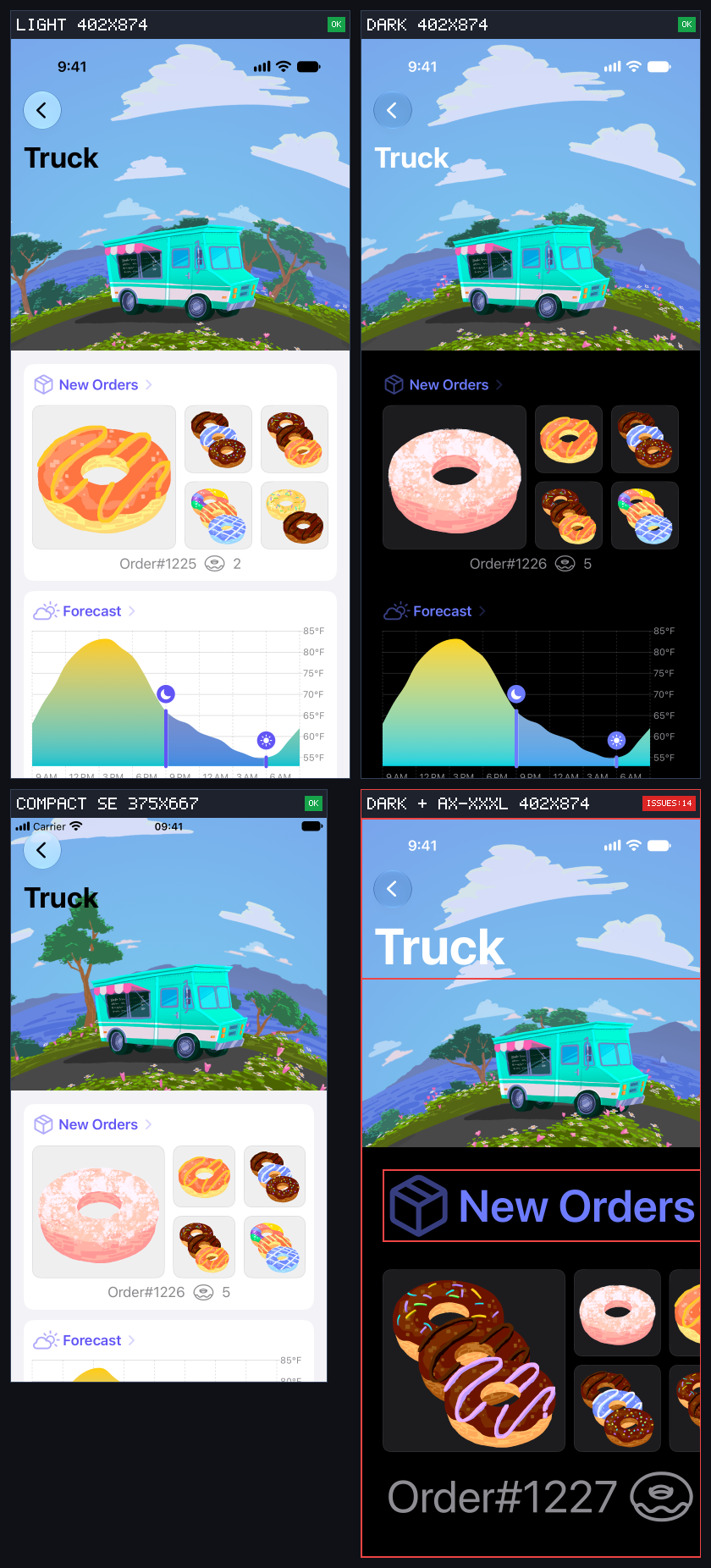
xcloom matrix · 未修图原始截图 · 840x1852 PNG · apple/sample-food-truck @ 3954a769e99f · 图:xcloom matrix 单次运行 · 14 项问题 · Xcode 27.2 · 2026-11-25 · 查看原图 PNG1.44s
xcloom canvas matrix-act · 另一次计时运行:Light · Compact · Dark + AX-XXXL · RTL · apple/sample-food-truck · iPhone 17 · 已预热轻量模拟器 · 1441.4 ms 中位数
3 轮 · 1433.7–1458.2 ms
- 11441.4 ms
- 21433.7 ms
- 31458.2 ms
1468.6 ms 进程内探针中位数
@ 5d48ca973c9e2026-11-25$ xcloom preflight ./Swiftfin.app --method app-store
xcloom preflight [FAIL]: ./Swiftfin.app (org.jellyfin.swiftfin v1.0 #1, method=app-store) — 19 checks passed in 2294.4 ms
[ERROR] ITMS-90208: executable 'Swiftfin' slice 'arm64' LC_BUILD_VERSION targets simulator platform 'ios-simulator'
[ERROR] ITMS-90035: ad-hoc signature (no signing certificate): devices and App Store Connect accept only code signed with an Apple Development or Apple Distribution certificate; `xcloom archive --adhoc-inspect` output is for inspection only
[ERROR] ITMS-90174: no embedded.mobileprovision: device builds must embed a provisioning profile that covers the bundle ID (`xcloom archive` with signing, or `xcloom provision`)
Mac15,14 (Apple M3 Ultra, 32 cores, 512 GB RAM, macOS 26.6.2 25G83) · Xcode 27.2 Build version 27B52 · xcloom 6cbf81a
共 31 项检查:19 项通过、11 项报错、1 项警告。这里特意用模拟器包,展示预检能拦下什么。
本地复现命令
如需复现仓库内置的 6 仓开源基准与模拟器瘦身脚本,先克隆 xcloom 并构建 release 二进制(若本机已通过 Homebrew 安装 xcloom,可直接传入 --xcloom "$(command -v xcloom)"):
git clone https://github.com/xcloom/xcloom.git
cd xcloom
cargo build --release -p xcloom-cli
bash scripts/bench/direct-engine-large-oss.sh --preset all --rounds 3 --wait-load 14 --export-dir tests/corpus/bench/large-oss-direct-engine
bash scripts/bench/direct-engine-food-truck.sh
bash scripts/bench/bench-sim-slim-vs-stock.sh --udid <UDID> --settle-secs 12 --rounds 2@ 3954a769e99f2026-11-21$ xcloom bench --repo . --rounds 2 --markdown
## XCLoom Benchmark: `wt1` (scheme `Food Truck`, `ios-simulator`)
- **Host:** Mac15,14 (Apple M3 Ultra, 512 GB RAM) | macOS 26.6.2 | Xcode 27.1 / Build version 27A9275 | xcloom `v0.10.0`
- **Setup:** commit `3954a76` | edit file `App/Account/SignUpView.swift` | `2` cold-started round(s) | `XCLOOM_NO_GLOBAL_CAS=1`, scrubbed `env -i`
- **Engine:** `direct` (auto-selected)
| Scenario | Native `xcodebuild` | `xcloom` (`direct`) | Speedup |
| --- | ---: | ---: | ---: |
| Cold, empty cache (wt1) | `23.51 s` (`23.05-23.96 s`) | `24.22 s` (`24.05-24.39 s`) | `0.97x` |
| No-change rebuild (wt1) | `2.48 s` (`2.34-2.62 s`) | `0.19 s` (`0.18-0.20 s`) | `13.05x` |
| First build, new worktree (wt2) | `23.78 s` (`23.19-24.38 s`) | `0.40 s` (`0.39-0.40 s`) | `59.45x` |
| 1-line Swift edit (wt2) | `3.61 s` (`3.57-3.65 s`) | `2.06 s` (`2.05-2.06 s`) | `1.75x` |
| 1-line edit live patch (xcloom hot) | — | `0.53 s` (`0.53-0.54 s`) | — |
Mac15,14 (Apple M3 Ultra, 32 cores, 512 GB RAM, macOS 26.6.2 25G83) · Xcode 27.1 Build version 27A9275 · xcloom 94ba00c
优化前的早期基线,当前版本重跑后会替换。
如需直接测量你自己的 iOS 工程,无需克隆基准脚本,将 xcloom bench 指向你的应用仓库即可(命令会在隔离的临时 worktree 中执行冷编对比,不改动当前工作区)。注:本页展示的 xcloom bench 终端输出录制于早期预发布版本(94ba00c,2026-11-21,早于 3c39d3c 合入并行 xcloom-car 资源编译),当时冷构建为 24.22s 对比 23.51s(0.97x),新建 worktree 23.78s -> 0.40s(59.45x)、单行编辑 3.61s -> 2.06s、xcloom hot 0.53s;当前版本的冷构建实测(7.78s 对比 23.90s,3.07x)见上方 6 仓对比表:
xcloom bench --repo /path/to/your-ios-app --rounds 2 --markdown
# 通过 Homebrew 安装(或 curl -fsSL https://xcloom.dev/install.sh | sh,默认装入 ~/.local/bin)
brew install xcloom/tap/xcloom

# 只读环境与模拟器检查(不改动任何工程配置)
xcloom doctor
xcloom sim status

# 接入编程 Agent 的 MCP 与 Skill(无需 Node;默认当前仓库,加 --global 为用户全局安装)
xcloom mcp install --claude --codex --cursor
xcloom skill install --claude --codex --cursor
也可以直接把下面一句话发给 Claude Code、Codex 或 Cursor,让 Agent 自动完成 CLI 安装、MCP 与 Skill 注册、环境校验和首次本地构建,并按需开启 git 合并驱动或运行当前仓库的构建对比测速:
Read https://xcloom.dev/agent-setup.md and set up XCLoom for this repository: install the CLI, register the MCP server and agent skill, verify the environment with xcloom doctor, and run a first local build with xcloom build --local --json. Optionally install the git merge drivers and run xcloom bench --repo . --json (isolated cold xcodebuild comparison; can take several minutes on large repositories).需要 macOS 及本地已安装的 Xcode SDK 与编译器。无需迁移工程格式,直接支持现有的 .xcodeproj、.xcworkspace、CocoaPods 与 XcodeGen 工程;独立 Package.swift 应用与暂不支持的构建规则会自动回退至 xcodebuild。